Programming in C (icar asrb net unit 2)
Programming in C
C programming is a general-purpose, procedural, imperative computer programming language developed in 1972 by Dennis M. Ritchie at the Bell Telephone Laboratories to develop the UNIX operating system. C is the most widely used computer language. It keeps fluctuating at number one scale of popularity along with Java programming language, which is also equally popular and most widely used among modern software programmers.
Why C Programming
C programming language is a MUST for students and working professionals to become a great Software Engineer specially when they are working in Software Development Domain. I will list down some of the key advantages of learning C Programming:
Easy to learn
Structured language
It produces efficient programs
It can handle low-level activities
It can be compiled on a variety of computer platforms
Facts about C
C was invented to write an operating system called UNIX.
C is a successor of B language which was introduced around the early 1970s.
The language was formalized in 1988 by the American National Standard Institute (ANSI).
The UNIX OS was totally written in C.
Today C is the most widely used and popular System Programming Language.
Most of the state-of-the-art software have been implemented using C.
Hello World using C Programming.
Just to give you a little excitement about C programming, I'm going to give you a small conventional C Programming Hello World program, You can try it using Demo link.
#include <stdio.h>

int main() {
   /* my first program in C */
   printf("Hello, World! \n");

   return 0;
}
Applications of C Programming
C was initially used for system development work, particularly the programs that make-up the operating system. C was adopted as a system development language because it produces code that runs nearly as fast as the code written in assembly language. Some examples of the use of C are -
Operating Systems
Language Compilers
Assemblers
Text Editors
Print Spoolers
Network Drivers
Modern Programs
Databases
Language Interpreters
Utilities
Audience
This tutorial is designed for software programmers with a need to understand the C programming language starting from scratch. This C tutorial will give you enough understanding on C programming language from where you can take yourself to higher level of expertise.
Prerequisites
Before proceeding with this tutorial, you should have a basic understanding of Computer Programming terminologies. A basic understanding of any of the programming languages will help you in understanding the C programming concepts and move fast on the learning track.
Overview
C is a general-purpose, high-level language that was originally developed by Dennis M. Ritchie to develop the UNIX operating system at Bell Labs. C was originally first implemented on the DEC PDP-11 computer in 1972.
In 1978, Brian Kernighan and Dennis Ritchie produced the first publicly available description of C, now known as the K&R standard.
The UNIX operating system, the C compiler, and essentially all UNIX application programs have been written in C. C has now become a widely used professional language for various reasons −
- Easy to learn
- Structured language
- It produces efficient programs
- It can handle low-level activities
- It can be compiled on a variety of computer platforms
Facts about C
C was invented to write an operating system called UNIX.
C is a successor of B language which was introduced around the early 1970s.
The language was formalized in 1988 by the American National Standard Institute (ANSI).
The UNIX OS was totally written in C.
Today C is the most widely used and popular System Programming Language.
Most of the state-of-the-art software have been implemented using C.
Today's most popular Linux OS and RDBMS MySQL have been written in C.
Why use C?
C was initially used for system development work, particularly the programs that make-up the operating system. C was adopted as a system development language because it produces code that runs nearly as fast as the code written in assembly language. Some examples of the use of C might be −
- Operating Systems
- Language Compilers
- Assemblers
- Text Editors
- Print Spoolers
- Network Drivers
- Modern Programs
- Databases
- Language Interpreters
- Utilities
C Programs
A C program can vary from 3 lines to millions of lines and it should be written into one or more text files with extension ".c"; for example, hello.c. You can use "vi", "vim" or any other text editor to write your C program into a file.
This tutorial assumes that you know how to edit a text file and how to write source code inside a program file.
Program Structure in C
A C program basically consists of the following parts −
- Preprocessor Commands
- Functions
- Variables
- Statements & Expressions
- Comments
Let us look at a simple code that would print the words "Hello World" −
#include <stdio.h>

int main() {
   /* my first program in C */
   printf("Hello, World! \n");

   return 0;
}
Let us take a look at the various parts of the above program −
The first line of the program #include <stdio.h> is a preprocessor command, which tells a C compiler to include stdio.h file before going to actual compilation.
The next line int main() is the main function where the program execution begins.
The next line /*...*/ will be ignored by the compiler and it has been put to add additional comments in the program. So such lines are called comments in the program.
The next line printf(...) is another function available in C which causes the message "Hello, World!" to be displayed on the screen.
The next line return 0; terminates the main() function and returns the value 0.
Compile and Execute C Program
Let us see how to save the source code in a file, and how to compile and run it. Following are the simple steps −
Open a text editor and add the above-mentioned code.
Save the file as hello.c
Open a command prompt and go to the directory where you have saved the file.
Type gcc hello.c and press enter to compile your code.
If there are no errors in your code, the command prompt will take you to the next line and would generate a.out executable file.
Now, type a.out to execute your program.
You will see the output "Hello World" printed on the screen.
$ gcc hello.c
$ ./a.out
Hello, World!
Make sure the gcc compiler is in your path and that you are running it in the directory containing the source file hello.c.
Basic Syntax
A C program consists of various tokens and a token is either a keyword, an identifier, a constant, a string literal, or a symbol. For example, the following C statement consists of five tokens −
printf("Hello, World! \n");
The individual tokens are −
printf
(
   "Hello, World! \n"
)
;
Semicolons
In a C program, the semicolon is a statement terminator. That is, each individual statement must be ended with a semicolon. It indicates the end of one logical entity.
Given below are two different statements −
printf("Hello, World! \n");
return 0;
Comments
Comments are like helping text in your C program and they are ignored by the compiler. They start with /* and terminate with the characters */ as shown below −
/* my first program in C */
You cannot have comments within comments and they do not occur within a string or character literals.
Identifiers
A C identifier is a name used to identify a variable, function, or any other user-defined item. An identifier starts with a letter A to Z, a to z, or an underscore '_' followed by zero or more letters, underscores, and digits (0 to 9).
C does not allow punctuation characters such as @, $, and % within identifiers. C is a case-sensitive programming language. Thus, Manpower and manpower are two different identifiers in C. Here are some examples of acceptable identifiers −
mohd       zara    abc   move_name  a_123
myname50   _temp   j     a23b9      retVal
Keywords
The following list shows the reserved words in C. These reserved words may not be used as constants or variables or any other identifier names.
| auto | else | long | switch |
| break | enum | register | typedef |
| case | extern | return | union |
| char | float | short | unsigned |
| const | for | signed | void |
| continue | goto | sizeof | volatile |
| default | if | static | while |
| do | int | struct | _Packed |
| double |
White space in C
A line containing only white space, possibly with a comment, is known as a blank line, and a C compiler totally ignores it.
White space is the term used in C to describe blanks, tabs, newline characters and comments. White space separates one part of a statement from another and enables the compiler to identify where one element in a statement, such as int, ends and the next element begins. Therefore, in the following statement −
int age;
there must be at least one whitespace character (usually a space) between int and age for the compiler to be able to distinguish them. On the other hand, in the following statement −
fruit = apples + oranges; // get the total fruit
no white space characters are necessary between fruit and =, or between = and apples, although you are free to include some if you wish to increase readability.
Data Types
| Sr.No. | Types & Description |
|---|---|
| 1 | Basic Types They are arithmetic types and are further classified into: (a) integer types and (b) floating-point types. |
| 2 | Enumerated types They are again arithmetic types and they are used to define variables that can only assign certain discrete integer values throughout the program. |
| 3 | The type void The type specifier void indicates that no value is available. |
| 4 | Derived types They include (a) Pointer types, (b) Array types, (c) Structure types, (d) Union types and (e) Function types. |
The array types and structure types are referred collectively as the aggregate types. The type of a function specifies the type of the function's return value. We will see the basic types in the following section, where as other types will be covered in the upcoming chapters.
Integer Types
The following table provides the details of standard integer types with their storage sizes and value ranges −
| Type | Storage size | Value range |
|---|---|---|
| char | 1 byte | -128 to 127 or 0 to 255 |
| unsigned char | 1 byte | 0 to 255 |
| signed char | 1 byte | -128 to 127 |
| int | 2 or 4 bytes | -32,768 to 32,767 or -2,147,483,648 to 2,147,483,647 |
| unsigned int | 2 or 4 bytes | 0 to 65,535 or 0 to 4,294,967,295 |
| short | 2 bytes | -32,768 to 32,767 |
| unsigned short | 2 bytes | 0 to 65,535 |
| long | 8 bytes or (4bytes for 32 bit OS) | -9223372036854775808 to 9223372036854775807 |
| unsigned long | 8 bytes | 0 to 18446744073709551615 |
To get the exact size of a type or a variable on a particular platform, you can use the sizeof operator. The expressions sizeof(type) yields the storage size of the object or type in bytes. Given below is an example to get the size of various type on a machine using different constant defined in limits.h header file −
#include <stdio.h>
#include <stdlib.h>
#include <limits.h>
#include <float.h>

int main(int argc, char** argv) {

    printf("CHAR_BIT    :   %d\n", CHAR_BIT);
    printf("CHAR_MAX    :   %d\n", CHAR_MAX);
    printf("CHAR_MIN    :   %d\n", CHAR_MIN);
    printf("INT_MAX     :   %d\n", INT_MAX);
    printf("INT_MIN     :   %d\n", INT_MIN);
    printf("LONG_MAX    :   %ld\n", (long) LONG_MAX);
    printf("LONG_MIN    :   %ld\n", (long) LONG_MIN);
    printf("SCHAR_MAX   :   %d\n", SCHAR_MAX);
    printf("SCHAR_MIN   :   %d\n", SCHAR_MIN);
    printf("SHRT_MAX    :   %d\n", SHRT_MAX);
    printf("SHRT_MIN    :   %d\n", SHRT_MIN);
    printf("UCHAR_MAX   :   %d\n", UCHAR_MAX);
    printf("UINT_MAX    :   %u\n", (unsigned int) UINT_MAX);
    printf("ULONG_MAX   :   %lu\n", (unsigned long) ULONG_MAX);
    printf("USHRT_MAX   :   %d\n", (unsigned short) USHRT_MAX);

    return 0;
}
When you compile and execute the above program, it produces the following result on Linux −
CHAR_BIT    :   8
CHAR_MAX    :   127
CHAR_MIN    :   -128
INT_MAX     :   2147483647
INT_MIN     :   -2147483648
LONG_MAX    :   9223372036854775807
LONG_MIN    :   -9223372036854775808
SCHAR_MAX   :   127
SCHAR_MIN   :   -128
SHRT_MAX    :   32767
SHRT_MIN    :   -32768
UCHAR_MAX   :   255
UINT_MAX    :   4294967295
ULONG_MAX   :   18446744073709551615
USHRT_MAX   :   65535
Floating-Point Types
The following table provide the details of standard floating-point types with storage sizes and value ranges and their precision −
| Type | Storage size | Value range | Precision |
|---|---|---|---|
| float | 4 byte | 1.2E-38 to 3.4E+38 | 6 decimal places |
| double | 8 byte | 2.3E-308 to 1.7E+308 | 15 decimal places |
| long double | 10 byte | 3.4E-4932 to 1.1E+4932 | 19 decimal places |
The header file float.h defines macros that allow you to use these values and other details about the binary representation of real numbers in your programs. The following example prints the storage space taken by a float type and its range values −
#include <stdio.h>
#include <stdlib.h>
#include <limits.h>
#include <float.h>

int main(int argc, char** argv) {

    printf("Storage size for float : %d \n", sizeof(float));
    printf("FLT_MAX     :   %g\n", (float) FLT_MAX);
    printf("FLT_MIN     :   %g\n", (float) FLT_MIN);
    printf("-FLT_MAX    :   %g\n", (float) -FLT_MAX);
    printf("-FLT_MIN    :   %g\n", (float) -FLT_MIN);
    printf("DBL_MAX     :   %g\n", (double) DBL_MAX);
    printf("DBL_MIN     :   %g\n", (double) DBL_MIN);
    printf("-DBL_MAX     :  %g\n", (double) -DBL_MAX);
    printf("Precision value: %d\n", FLT_DIG );

    return 0;
}
When you compile and execute the above program, it produces the following result on Linux −
Storage size for float : 4
FLT_MAX      :   3.40282e+38
FLT_MIN      :   1.17549e-38
-FLT_MAX     :   -3.40282e+38
-FLT_MIN     :   -1.17549e-38
DBL_MAX      :   1.79769e+308
DBL_MIN      :   2.22507e-308
-DBL_MAX     :  -1.79769e+308
Precision value: 6
The void Type
The void type specifies that no value is available. It is used in three kinds of situations −
| Sr.No. | Types & Description |
|---|---|
| 1 | Function returns as void There are various functions in C which do not return any value or you can say they return void. A function with no return value has the return type as void. For example, void exit (int status); |
| 2 | Function arguments as void There are various functions in C which do not accept any parameter. A function with no parameter can accept a void. For example, int rand(void); |
| 3 | Pointers to void A pointer of type void * represents the address of an object, but not its type. For example, a memory allocation function void *malloc( size_t size ); returns a pointer to void which can be casted to any data type. |
Variables
The name of a variable can be composed of letters, digits, and the underscore character. It must begin with either a letter or an underscore. Upper and lowercase letters are distinct because C is case-sensitive. Based on the basic types explained in the previous chapter, there will be the following basic variable types −
| Sr.No. | Type & Description |
|---|---|
| 1 | char Typically a single octet(one byte). It is an integer type. |
| 2 | int The most natural size of integer for the machine. |
| 3 | float A single-precision floating point value. |
| 4 | double A double-precision floating point value. |
| 5 | void Represents the absence of type. |
C programming language also allows to define various other types of variables, which we will cover in subsequent chapters like Enumeration, Pointer, Array, Structure, Union, etc. For this chapter, let us study only basic variable types.
Variable Definition in C
A variable definition tells the compiler where and how much storage to create for the variable. A variable definition specifies a data type and contains a list of one or more variables of that type as follows −
type variable_list;
Here, type must be a valid C data type including char, w_char, int, float, double, bool, or any user-defined object; and variable_list may consist of one or more identifier names separated by commas. Some valid declarations are shown here −
int    i, j, k;
char   c, ch;
float  f, salary;
double d;
The line int i, j, k; declares and defines the variables i, j, and k; which instruct the compiler to create variables named i, j and k of type int.
Variables can be initialized (assigned an initial value) in their declaration. The initializer consists of an equal sign followed by a constant expression as follows −
type variable_name = value;
Some examples are −
extern int d = 3, f = 5;    // declaration of d and f.
int d = 3, f = 5;           // definition and initializing d and f.
byte z = 22;                // definition and initializes z.
char x = 'x';               // the variable x has the value 'x'.
For definition without an initializer: variables with static storage duration are implicitly initialized with NULL (all bytes have the value 0); the initial value of all other variables are undefined.
Variable Declaration in C
A variable declaration provides assurance to the compiler that there exists a variable with the given type and name so that the compiler can proceed for further compilation without requiring the complete detail about the variable. A variable definition has its meaning at the time of compilation only, the compiler needs actual variable definition at the time of linking the program.
A variable declaration is useful when you are using multiple files and you define your variable in one of the files which will be available at the time of linking of the program. You will use the keyword extern to declare a variable at any place. Though you can declare a variable multiple times in your C program, it can be defined only once in a file, a function, or a block of code.
Example
Try the following example, where variables have been declared at the top, but they have been defined and initialized inside the main function −
#include <stdio.h>

// Variable declaration:
extern int a, b;
extern int c;
extern float f;

int main () {

   /* variable definition: */
   int a, b;
   int c;
   float f;

   /* actual initialization */
   a = 10;
   b = 20;

   c = a + b;
   printf("value of c : %d \n", c);

   f = 70.0/3.0;
   printf("value of f : %f \n", f);

   return 0;
}
When the above code is compiled and executed, it produces the following result −
value of c : 30
value of f : 23.333334
The same concept applies on function declaration where you provide a function name at the time of its declaration and its actual definition can be given anywhere else. For example −
// function declaration
int func();

int main() {

   // function call
   int i = func();
}

// function definition
int func() {
   return 0;
}
Lvalues and Rvalues in C
There are two kinds of expressions in C −
lvalue − Expressions that refer to a memory location are called "lvalue" expressions. An lvalue may appear as either the left-hand or right-hand side of an assignment.
rvalue − The term rvalue refers to a data value that is stored at some address in memory. An rvalue is an expression that cannot have a value assigned to it which means an rvalue may appear on the right-hand side but not on the left-hand side of an assignment.
Variables are lvalues and so they may appear on the left-hand side of an assignment. Numeric literals are rvalues and so they may not be assigned and cannot appear on the left-hand side. Take a look at the following valid and invalid statements −
int g = 20; // valid statement

10 = 20; // invalid statement; would generate compile-time error
Constants and Literals
Constants refer to fixed values that the program may not alter during its execution. These fixed values are also called literals.
Constants can be of any of the basic data types like an integer constant, a floating constant, a character constant, or a string literal. There are enumeration constants as well.
Constants are treated just like regular variables except that their values cannot be modified after their definition.
Integer Literals
An integer literal can be a decimal, octal, or hexadecimal constant. A prefix specifies the base or radix: 0x or 0X for hexadecimal, 0 for octal, and nothing for decimal.
An integer literal can also have a suffix that is a combination of U and L, for unsigned and long, respectively. The suffix can be uppercase or lowercase and can be in any order.
Here are some examples of integer literals −
212         /* Legal */
215u        /* Legal */
0xFeeL      /* Legal */
078         /* Illegal: 8 is not an octal digit */
032UU       /* Illegal: cannot repeat a suffix */
Following are other examples of various types of integer literals −
85         /* decimal */
0213       /* octal */
0x4b       /* hexadecimal */
30         /* int */
30u        /* unsigned int */
30l        /* long */
30ul       /* unsigned long */
Floating-point Literals
A floating-point literal has an integer part, a decimal point, a fractional part, and an exponent part. You can represent floating point literals either in decimal form or exponential form.
While representing decimal form, you must include the decimal point, the exponent, or both; and while representing exponential form, you must include the integer part, the fractional part, or both. The signed exponent is introduced by e or E.
Here are some examples of floating-point literals −
3.14159       /* Legal */
314159E-5L    /* Legal */
510E          /* Illegal: incomplete exponent */
210f          /* Illegal: no decimal or exponent */
.e55          /* Illegal: missing integer or fraction */
Character Constants
Character literals are enclosed in single quotes, e.g., 'x' can be stored in a simple variable of char type.
A character literal can be a plain character (e.g., 'x'), an escape sequence (e.g., '\t'), or a universal character (e.g., '\u02C0').
There are certain characters in C that represent special meaning when preceded by a backslash for example, newline (\n) or tab (\t).
Following is the example to show a few escape sequence characters −
#include <stdio.h>

int main() {
   printf("Hello\tWorld\n\n");

   return 0;
}
When the above code is compiled and executed, it produces the following result −
Hello World
String Literals
String literals or constants are enclosed in double quotes "". A string contains characters that are similar to character literals: plain characters, escape sequences, and universal characters.
You can break a long line into multiple lines using string literals and separating them using white spaces.
Here are some examples of string literals. All the three forms are identical strings.
"hello, dear"

"hello, \

dear"

"hello, " "d" "ear"
Defining Constants
There are two simple ways in C to define constants −
Using #define preprocessor.
Using const keyword.
The #define Preprocessor
Given below is the form to use #define preprocessor to define a constant −
#define identifier value
The following example explains it in detail −
#include <stdio.h>

#define LENGTH 10
#define WIDTH  5
#define NEWLINE '\n'

int main() {
   int area;

   area = LENGTH * WIDTH;
   printf("value of area : %d", area);
   printf("%c", NEWLINE);

   return 0;
}
When the above code is compiled and executed, it produces the following result −
value of area : 50
The const Keyword
You can use const prefix to declare constants with a specific type as follows −
const type variable = value;
The following example explains it in detail −
#include <stdio.h>

int main() {
   const int  LENGTH = 10;
   const int  WIDTH = 5;
   const char NEWLINE = '\n';
   int area;

   area = LENGTH * WIDTH;
   printf("value of area : %d", area);
   printf("%c", NEWLINE);

   return 0;
}
When the above code is compiled and executed, it produces the following result −
value of area : 50
Note that it is a good programming practice to define constants in CAPITALS.
Storage Classes
A storage class defines the scope (visibility) and life-time of variables and/or functions within a C Program. They precede the type that they modify. We have four different storage classes in a C program −
- auto
- register
- static
- extern
The auto Storage Class
The auto storage class is the default storage class for all local variables.
{
   int mount;
   auto int month;
}
The example above defines two variables with in the same storage class. 'auto' can only be used within functions, i.e., local variables.
The register Storage Class
The register storage class is used to define local variables that should be stored in a register instead of RAM. This means that the variable has a maximum size equal to the register size (usually one word) and can't have the unary '&' operator applied to it (as it does not have a memory location).
{
   register int  miles;
}
The register should only be used for variables that require quick access such as counters. It should also be noted that defining 'register' does not mean that the variable will be stored in a register. It means that it MIGHT be stored in a register depending on hardware and implementation restrictions.
The static Storage Class
The static storage class instructs the compiler to keep a local variable in existence during the life-time of the program instead of creating and destroying it each time it comes into and goes out of scope. Therefore, making local variables static allows them to maintain their values between function calls.
The static modifier may also be applied to global variables. When this is done, it causes that variable's scope to be restricted to the file in which it is declared.
In C programming, when static is used on a global variable, it causes only one copy of that member to be shared by all the objects of its class.
#include <stdio.h>

/* function declaration */
void func(void);

static int count = 5; /* global variable */

main() {

   while(count--) {
      func();
   }

   return 0;
}

/* function definition */
void func( void ) {

   static int i = 5; /* local static variable */
   i++;

   printf("i is %d and count is %d\n", i, count);
}
When the above code is compiled and executed, it produces the following result −
i is 6 and count is 4
i is 7 and count is 3
i is 8 and count is 2
i is 9 and count is 1
i is 10 and count is 0
The extern Storage Class
The extern storage class is used to give a reference of a global variable that is visible to ALL the program files. When you use 'extern', the variable cannot be initialized however, it points the variable name at a storage location that has been previously defined.
When you have multiple files and you define a global variable or function, which will also be used in other files, then extern will be used in another file to provide the reference of defined variable or function. Just for understanding, extern is used to declare a global variable or function in another file.
The extern modifier is most commonly used when there are two or more files sharing the same global variables or functions as explained below.
First File: main.c
#include <stdio.h>

int count ;
extern void write_extern();

main() {
   count = 5;
   write_extern();
}
Second File: support.c
#include <stdio.h>

extern int count;

void write_extern(void) {
   printf("count is %d\n", count);
}
Here, extern is being used to declare count in the second file, where as it has its definition in the first file, main.c. Now, compile these two files as follows −
$gcc main.c support.c
It will produce the executable program a.out. When this program is executed, it produces the following result −
count is 5
Operators
An operator is a symbol that tells the compiler to perform specific mathematical or logical functions. C language is rich in built-in operators and provides the following types of operators −
- Arithmetic Operators
- Relational Operators
- Logical Operators
- Bitwise Operators
- Assignment Operators
- Misc Operators
We will, in this chapter, look into the way each operator works.
Arithmetic Operators
The following table shows all the arithmetic operators supported by the C language. Assume variable A holds 10 and variable B holds 20 then −
| Operator | Description | Example |
|---|---|---|
| + | Adds two operands. | A + B = 30 |
| − | Subtracts second operand from the first. | A − B = -10 |
| * | Multiplies both operands. | A * B = 200 |
| / | Divides numerator by de-numerator. | B / A = 2 |
| % | Modulus Operator and remainder of after an integer division. | B % A = 0 |
| ++ | Increment operator increases the integer value by one. | A++ = 11 |
| -- | Decrement operator decreases the integer value by one. | A-- = 9 |
Relational Operators
The following table shows all the relational operators supported by C. Assume variable A holds 10 and variable B holds 20 then −
| Operator | Description | Example |
|---|---|---|
| == | Checks if the values of two operands are equal or not. If yes, then the condition becomes true. | (A == B) is not true. |
| != | Checks if the values of two operands are equal or not. If the values are not equal, then the condition becomes true. | (A != B) is true. |
| > | Checks if the value of left operand is greater than the value of right operand. If yes, then the condition becomes true. | (A > B) is not true. |
| < | Checks if the value of left operand is less than the value of right operand. If yes, then the condition becomes true. | (A < B) is true. |
| >= | Checks if the value of left operand is greater than or equal to the value of right operand. If yes, then the condition becomes true. | (A >= B) is not true. |
| <= | Checks if the value of left operand is less than or equal to the value of right operand. If yes, then the condition becomes true. | (A <= B) is true. |
Logical Operators
Following table shows all the logical operators supported by C language. Assume variable A holds 1 and variable B holds 0, then −
| Operator | Description | Example |
|---|---|---|
| && | Called Logical AND operator. If both the operands are non-zero, then the condition becomes true. | (A && B) is false. |
| || | Called Logical OR Operator. If any of the two operands is non-zero, then the condition becomes true. | (A || B) is true. |
| ! | Called Logical NOT Operator. It is used to reverse the logical state of its operand. If a condition is true, then Logical NOT operator will make it false. | !(A && B) is true. |
Bitwise Operators
Bitwise operator works on bits and perform bit-by-bit operation. The truth tables for &, |, and ^ is as follows −
| p | q | p & q | p | q | p ^ q |
|---|---|---|---|---|
| 0 | 0 | 0 | 0 | 0 |
| 0 | 1 | 0 | 1 | 1 |
| 1 | 1 | 1 | 1 | 0 |
| 1 | 0 | 0 | 1 | 1 |
Assume A = 60 and B = 13 in binary format, they will be as follows −
A = 0011 1100
B = 0000 1101
-----------------
A&B = 0000 1100
A|B = 0011 1101
A^B = 0011 0001
~A = 1100 0011
The following table lists the bitwise operators supported by C. Assume variable 'A' holds 60 and variable 'B' holds 13, then −
| Operator | Description | Example |
|---|---|---|
| & | Binary AND Operator copies a bit to the result if it exists in both operands. | (A & B) = 12, i.e., 0000 1100 |
| | | Binary OR Operator copies a bit if it exists in either operand. | (A | B) = 61, i.e., 0011 1101 |
| ^ | Binary XOR Operator copies the bit if it is set in one operand but not both. | (A ^ B) = 49, i.e., 0011 0001 |
| ~ | Binary One's Complement Operator is unary and has the effect of 'flipping' bits. | (~A ) = ~(60), i.e,. -0111101 |
| << | Binary Left Shift Operator. The left operands value is moved left by the number of bits specified by the right operand. | A << 2 = 240 i.e., 1111 0000 |
| >> | Binary Right Shift Operator. The left operands value is moved right by the number of bits specified by the right operand. | A >> 2 = 15 i.e., 0000 1111 |
Assignment Operators
The following table lists the assignment operators supported by the C language −
| Operator | Description | Example |
|---|---|---|
| = | Simple assignment operator. Assigns values from right side operands to left side operand | C = A + B will assign the value of A + B to C |
| += | Add AND assignment operator. It adds the right operand to the left operand and assign the result to the left operand. | C += A is equivalent to C = C + A |
| -= | Subtract AND assignment operator. It subtracts the right operand from the left operand and assigns the result to the left operand. | C -= A is equivalent to C = C - A |
| *= | Multiply AND assignment operator. It multiplies the right operand with the left operand and assigns the result to the left operand. | C *= A is equivalent to C = C * A |
| /= | Divide AND assignment operator. It divides the left operand with the right operand and assigns the result to the left operand. | C /= A is equivalent to C = C / A |
| %= | Modulus AND assignment operator. It takes modulus using two operands and assigns the result to the left operand. | C %= A is equivalent to C = C % A |
| <<= | Left shift AND assignment operator. | C <<= 2 is same as C = C << 2 |
| >>= | Right shift AND assignment operator. | C >>= 2 is same as C = C >> 2 |
| &= | Bitwise AND assignment operator. | C &= 2 is same as C = C & 2 |
| ^= | Bitwise exclusive OR and assignment operator. | C ^= 2 is same as C = C ^ 2 |
| |= | Bitwise inclusive OR and assignment operator. | C |= 2 is same as C = C | 2 |
Misc Operators ↦ sizeof & ternary
Besides the operators discussed above, there are a few other important operators including sizeof and ? : supported by the C Language.
| Operator | Description | Example |
|---|---|---|
| sizeof() | Returns the size of a variable. | sizeof(a), where a is integer, will return 4. |
| & | Returns the address of a variable. | &a; returns the actual address of the variable. |
| * | Pointer to a variable. | *a; |
| ? : | Conditional Expression. | If Condition is true ? then value X : otherwise value Y |
Operators Precedence in C
Operator precedence determines the grouping of terms in an expression and decides how an expression is evaluated. Certain operators have higher precedence than others; for example, the multiplication operator has a higher precedence than the addition operator.
For example, x = 7 + 3 * 2; here, x is assigned 13, not 20 because operator * has a higher precedence than +, so it first gets multiplied with 3*2 and then adds into 7.
Here, operators with the highest precedence appear at the top of the table, those with the lowest appear at the bottom. Within an expression, higher precedence operators will be evaluated first.
| Category | Operator | Associativity |
|---|---|---|
| Postfix | () [] -> . ++ - - | Left to right |
| Unary | + - ! ~ ++ - - (type)* & sizeof | Right to left |
| Multiplicative | * / % | Left to right |
| Additive | + - | Left to right |
| Shift | << >> | Left to right |
| Relational | < <= > >= | Left to right |
| Equality | == != | Left to right |
| Bitwise AND | & | Left to right |
| Bitwise XOR | ^ | Left to right |
| Bitwise OR | | | Left to right |
| Logical AND | && | Left to right |
| Logical OR | || | Left to right |
| Conditional | ?: | Right to left |
| Assignment | = += -= *= /= %=>>= <<= &= ^= |= | Right to left |
| Comma | , | Left to right |
Loops
Programming languages provide various control structures that allow for more complicated execution paths.
A loop statement allows us to execute a statement or group of statements multiple times. Given below is the general form of a loop statement in most of the programming languages −
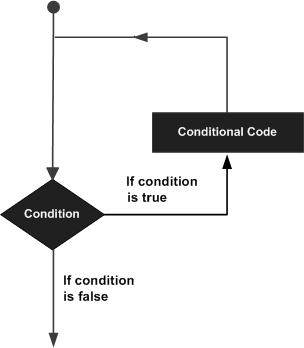
C programming language provides the following types of loops to handle looping requirements.
| Sr.No. | Loop Type & Description |
|---|---|
| 1 | while loop Repeats a statement or group of statements while a given condition is true. It tests the condition before executing the loop body. |
| 2 | for loop Executes a sequence of statements multiple times and abbreviates the code that manages the loop variable. |
| 3 | do...while loop It is more like a while statement, except that it tests the condition at the end of the loop body. |
| 4 | nested loops You can use one or more loops inside any other while, for, or do..while loop. |
Loop Control Statements
Loop control statements change execution from its normal sequence. When execution leaves a scope, all automatic objects that were created in that scope are destroyed.
C supports the following control statements.
| Sr.No. | Control Statement & Description |
|---|---|
| 1 | break statement Terminates the loop or switch statement and transfers execution to the statement immediately following the loop or switch. |
| 2 | continue statement Causes the loop to skip the remainder of its body and immediately retest its condition prior to reiterating. |
| 3 | goto statement Transfers control to the labeled statement. |
The Infinite Loop
A loop becomes an infinite loop if a condition never becomes false. The for loop is traditionally used for this purpose. Since none of the three expressions that form the 'for' loop are required, you can make an endless loop by leaving the conditional expression empty.
#include <stdio.h>

int main () {

   for( ; ; ) {
      printf("This loop will run forever.\n");
   }

   return 0;
}
When the conditional expression is absent, it is assumed to be true. You may have an initialization and increment expression, but C programmers more commonly use the for(;;) construct to signify an infinite loop.
NOTE − You can terminate an infinite loop by pressing Ctrl + C keys.
Functions
function is a group of statements that together perform a task. Every C program has at least one function, which is main(), and all the most trivial programs can define additional functions.
You can divide up your code into separate functions. How you divide up your code among different functions is up to you, but logically the division is such that each function performs a specific task.
A function declaration tells the compiler about a function's name, return type, and parameters. A function definition provides the actual body of the function.
The C standard library provides numerous built-in functions that your program can call. For example, strcat() to concatenate two strings, memcpy() to copy one memory location to another location, and many more functions.
A function can also be referred as a method or a sub-routine or a procedure, etc.
Defining a Function
The general form of a function definition in C programming language is as follows −
return_type function_name( parameter list ) {
   body of the function
}
A function definition in C programming consists of a function header and a function body. Here are all the parts of a function −
Return Type − A function may return a value. The return_type is the data type of the value the function returns. Some functions perform the desired operations without returning a value. In this case, the return_type is the keyword void.
Function Name − This is the actual name of the function. The function name and the parameter list together constitute the function signature.
Parameters − A parameter is like a placeholder. When a function is invoked, you pass a value to the parameter. This value is referred to as actual parameter or argument. The parameter list refers to the type, order, and number of the parameters of a function. Parameters are optional; that is, a function may contain no parameters.
Function Body − The function body contains a collection of statements that define what the function does.
Example
Given below is the source code for a function called max(). This function takes two parameters num1 and num2 and returns the maximum value between the two −
/* function returning the max between two numbers */
int max(int num1, int num2) {

   /* local variable declaration */
   int result;

   if (num1 > num2)
      result = num1;
   else
      result = num2;

   return result;
}
Function Declarations
A function declaration tells the compiler about a function name and how to call the function. The actual body of the function can be defined separately.
A function declaration has the following parts −
return_type function_name( parameter list );
For the above defined function max(), the function declaration is as follows −
int max(int num1, int num2);
Parameter names are not important in function declaration only their type is required, so the following is also a valid declaration −
int max(int, int);
Function declaration is required when you define a function in one source file and you call that function in another file. In such case, you should declare the function at the top of the file calling the function.
Calling a Function
While creating a C function, you give a definition of what the function has to do. To use a function, you will have to call that function to perform the defined task.
When a program calls a function, the program control is transferred to the called function. A called function performs a defined task and when its return statement is executed or when its function-ending closing brace is reached, it returns the program control back to the main program.
To call a function, you simply need to pass the required parameters along with the function name, and if the function returns a value, then you can store the returned value. For example −
#include <stdio.h>

/* function declaration */
int max(int num1, int num2);

int main () {

   /* local variable definition */
   int a = 100;
   int b = 200;
   int ret;

   /* calling a function to get max value */
   ret = max(a, b);

   printf( "Max value is : %d\n", ret );

   return 0;
}

/* function returning the max between two numbers */
int max(int num1, int num2) {

   /* local variable declaration */
   int result;

   if (num1 > num2)
      result = num1;
   else
      result = num2;

   return result;
}
We have kept max() along with main() and compiled the source code. While running the final executable, it would produce the following result −
Max value is : 200
Function Arguments
If a function is to use arguments, it must declare variables that accept the values of the arguments. These variables are called the formal parameters of the function.
Formal parameters behave like other local variables inside the function and are created upon entry into the function and destroyed upon exit.
While calling a function, there are two ways in which arguments can be passed to a function −
| Sr.No. | Call Type & Description |
|---|---|
| 1 | Call by value This method copies the actual value of an argument into the formal parameter of the function. In this case, changes made to the parameter inside the function have no effect on the argument. |
| 2 | Call by reference This method copies the address of an argument into the formal parameter. Inside the function, the address is used to access the actual argument used in the call. This means that changes made to the parameter affect the argument. |
By default, C uses call by value to pass arguments. In general, it means the code within a function cannot alter the arguments used to call the function.
Scope Rules
scope in any programming is a region of the program where a defined variable can have its existence and beyond that variable it cannot be accessed. There are three places where variables can be declared in C programming language −
Inside a function or a block which is called local variables.
Outside of all functions which is called global variables.
In the definition of function parameters which are called formal parameters.
Let us understand what are local and global variables, and formal parameters.
Local Variables
Variables that are declared inside a function or block are called local variables. They can be used only by statements that are inside that function or block of code. Local variables are not known to functions outside their own. The following example shows how local variables are used. Here all the variables a, b, and c are local to main() function.
#include <stdio.h>

int main () {

  /* local variable declaration */
  int a, b;
  int c;

  /* actual initialization */
  a = 10;
  b = 20;
  c = a + b;

  printf ("value of a = %d, b = %d and c = %d\n", a, b, c);

  return 0;
}
Global Variables
Global variables are defined outside a function, usually on top of the program. Global variables hold their values throughout the lifetime of your program and they can be accessed inside any of the functions defined for the program.
A global variable can be accessed by any function. That is, a global variable is available for use throughout your entire program after its declaration. The following program show how global variables are used in a program.
#include <stdio.h>

/* global variable declaration */
int g;

int main () {

  /* local variable declaration */
  int a, b;

  /* actual initialization */
  a = 10;
  b = 20;
  g = a + b;

  printf ("value of a = %d, b = %d and g = %d\n", a, b, g);

  return 0;
}
A program can have same name for local and global variables but the value of local variable inside a function will take preference. Here is an example −
#include <stdio.h>

/* global variable declaration */
int g = 20;

int main () {

  /* local variable declaration */
  int g = 10;

  printf ("value of g = %d\n",  g);

  return 0;
}
When the above code is compiled and executed, it produces the following result −
value of g = 10
Formal Parameters
Formal parameters, are treated as local variables with-in a function and they take precedence over global variables. Following is an example −
#include <stdio.h>

/* global variable declaration */
int a = 20;

int main () {

  /* local variable declaration in main function */
  int a = 10;
  int b = 20;
  int c = 0;

  printf ("value of a in main() = %d\n",  a);
  c = sum( a, b);
  printf ("value of c in main() = %d\n",  c);

  return 0;
}

/* function to add two integers */
int sum(int a, int b) {

   printf ("value of a in sum() = %d\n",  a);
   printf ("value of b in sum() = %d\n",  b);

   return a + b;
}
When the above code is compiled and executed, it produces the following result −
value of a in main() = 10
value of a in sum() = 10
value of b in sum() = 20
value of c in main() = 30
Initializing Local and Global Variables
When a local variable is defined, it is not initialized by the system, you must initialize it yourself. Global variables are initialized automatically by the system when you define them as follows −
| Data Type | Initial Default Value |
|---|---|
| int | 0 |
| char | '\0' |
| float | 0 |
| double | 0 |
| pointer | NULL |
It is a good programming practice to initialize variables properly, otherwise your program may produce unexpected results, because uninitialized variables will take some garbage value already available at their memory location.
Arrays
Arrays a kind of data structure that can store a fixed-size sequential collection of elements of the same type. An array is used to store a collection of data, but it is often more useful to think of an array as a collection of variables of the same type.
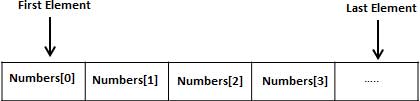
Instead of declaring individual variables, such as number0, number1, ..., and number99, you declare one array variable such as numbers and use numbers[0], numbers[1], and ..., numbers[99] to represent individual variables. A specific element in an array is accessed by an index.
All arrays consist of contiguous memory locations. The lowest address corresponds to the first element and the highest address to the last element.
Declaring Arrays
To declare an array in C, a programmer specifies the type of the elements and the number of elements required by an array as follows −
type arrayName [ arraySize ];
This is called a single-dimensional array. The arraySize must be an integer constant greater than zero and type can be any valid C data type. For example, to declare a 10-element array called balance of type double, use this statement −
double balance[10];
Here balance is a variable array which is sufficient to hold up to 10 double numbers.
Initializing Arrays
You can initialize an array in C either one by one or using a single statement as follows −
double balance[5] = {1000.0, 2.0, 3.4, 7.0, 50.0};
The number of values between braces { } cannot be larger than the number of elements that we declare for the array between square brackets [ ].
If you omit the size of the array, an array just big enough to hold the initialization is created. Therefore, if you write −
double balance[] = {1000.0, 2.0, 3.4, 7.0, 50.0};
You will create exactly the same array as you did in the previous example. Following is an example to assign a single element of the array −
balance[4] = 50.0;
The above statement assigns the 5th element in the array with a value of 50.0. All arrays have 0 as the index of their first element which is also called the base index and the last index of an array will be total size of the array minus 1. Shown below is the pictorial representation of the array we discussed above −

Accessing Array Elements
An element is accessed by indexing the array name. This is done by placing the index of the element within square brackets after the name of the array. For example −
double salary = balance[9];
The above statement will take the 10th element from the array and assign the value to salary variable. The following example Shows how to use all the three above mentioned concepts viz. declaration, assignment, and accessing arrays −
#include <stdio.h>

int main () {

   int n[ 10 ]; /* n is an array of 10 integers */
   int i,j;

   /* initialize elements of array n to 0 */
   for ( i = 0; i < 10; i++ ) {
      n[ i ] = i + 100; /* set element at location i to i + 100 */
   }

   /* output each array element's value */
   for (j = 0; j < 10; j++ ) {
      printf("Element[%d] = %d\n", j, n[j] );
   }

   return 0;
}
When the above code is compiled and executed, it produces the following result −
Element[0] = 100
Element[1] = 101
Element[2] = 102
Element[3] = 103
Element[4] = 104
Element[5] = 105
Element[6] = 106
Element[7] = 107
Element[8] = 108
Element[9] = 109
Arrays in Detail
Arrays are important to C and should need a lot more attention. The following important concepts related to array should be clear to a C programmer −
| Sr.No. | Concept & Description |
|---|---|
| 1 | Multi-dimensional arrays C supports multidimensional arrays. The simplest form of the multidimensional array is the two-dimensional array. |
| 2 | Passing arrays to functions You can pass to the function a pointer to an array by specifying the array's name without an index. |
| 3 | Return array from a function C allows a function to return an array. |
| 4 | Pointer to an array You can generate a pointer to the first element of an array by simply specifying the array name, without any index. |
Pointers
Pointers in C are easy and fun to learn. Some C programming tasks are performed more easily with pointers, and other tasks, such as dynamic memory allocation, cannot be performed without using pointers. So it becomes necessary to learn pointers to become a perfect C programmer. Let's start learning them in simple and easy steps.
As you know, every variable is a memory location and every memory location has its address defined which can be accessed using ampersand (&) operator, which denotes an address in memory. Consider the following example, which prints the address of the variables defined −
#include <stdio.h>

int main () {

   int  var1;
   char var2[10];

   printf("Address of var1 variable: %x\n", &var1  );
   printf("Address of var2 variable: %x\n", &var2  );

   return 0;
}
When the above code is compiled and executed, it produces the following result −
Address of var1 variable: bff5a400
Address of var2 variable: bff5a3f6
What are Pointers?
A pointer is a variable whose value is the address of another variable, i.e., direct address of the memory location. Like any variable or constant, you must declare a pointer before using it to store any variable address. The general form of a pointer variable declaration is −
type *var-name;
Here, type is the pointer's base type; it must be a valid C data type and var-name is the name of the pointer variable. The asterisk * used to declare a pointer is the same asterisk used for multiplication. However, in this statement the asterisk is being used to designate a variable as a pointer. Take a look at some of the valid pointer declarations −
int    *ip;    /* pointer to an integer */
double *dp;    /* pointer to a double */
float  *fp;    /* pointer to a float */
char   *ch     /* pointer to a character */
The actual data type of the value of all pointers, whether integer, float, character, or otherwise, is the same, a long hexadecimal number that represents a memory address. The only difference between pointers of different data types is the data type of the variable or constant that the pointer points to.
How to Use Pointers?
There are a few important operations, which we will do with the help of pointers very frequently. (a) We define a pointer variable, (b) assign the address of a variable to a pointer and (c) finally access the value at the address available in the pointer variable. This is done by using unary operator * that returns the value of the variable located at the address specified by its operand. The following example makes use of these operations −
#include <stdio.h>

int main () {

   int  var = 20;   /* actual variable declaration */
   int  *ip;        /* pointer variable declaration */

   ip = &var;  /* store address of var in pointer variable*/

   printf("Address of var variable: %x\n", &var  );

   /* address stored in pointer variable */
   printf("Address stored in ip variable: %x\n", ip );

   /* access the value using the pointer */
   printf("Value of *ip variable: %d\n", *ip );

   return 0;
}
When the above code is compiled and executed, it produces the following result −
Address of var variable: bffd8b3c
Address stored in ip variable: bffd8b3c
Value of *ip variable: 20
NULL Pointers
It is always a good practice to assign a NULL value to a pointer variable in case you do not have an exact address to be assigned. This is done at the time of variable declaration. A pointer that is assigned NULL is called a null pointer.
The NULL pointer is a constant with a value of zero defined in several standard libraries. Consider the following program −
#include <stdio.h>

int main () {

   int  *ptr = NULL;

   printf("The value of ptr is : %x\n", ptr  );

   return 0;
}
When the above code is compiled and executed, it produces the following result −
The value of ptr is 0
In most of the operating systems, programs are not permitted to access memory at address 0 because that memory is reserved by the operating system. However, the memory address 0 has special significance; it signals that the pointer is not intended to point to an accessible memory location. But by convention, if a pointer contains the null (zero) value, it is assumed to point to nothing.
To check for a null pointer, you can use an 'if' statement as follows −
if(ptr)     /* succeeds if p is not null */
if(!ptr)    /* succeeds if p is null */
Pointers in Detail
Pointers have many but easy concepts and they are very important to C programming. The following important pointer concepts should be clear to any C programmer −
| Sr.No. | Concept & Description |
|---|---|
| 1 | Pointer arithmetic There are four arithmetic operators that can be used in pointers: ++, --, +, - |
| 2 | Array of pointers You can define arrays to hold a number of pointers. |
| 3 | Pointer to pointer C allows you to have pointer on a pointer and so on. |
| 4 | Passing pointers to functions in C Passing an argument by reference or by address enable the passed argument to be changed in the calling function by the called function. |
| 5 | Return pointer from functions in C C allows a function to return a pointer to the local variable, static variable, and dynamically allocated memory as well. |
Strings
Strings are actually one-dimensional array of characters terminated by a null character '\0'. Thus a null-terminated string contains the characters that comprise the string followed by a null.
The following declaration and initialization create a string consisting of the word "Hello". To hold the null character at the end of the array, the size of the character array containing the string is one more than the number of characters in the word "Hello."
char greeting[6] = {'H', 'e', 'l', 'l', 'o', '\0'};
If you follow the rule of array initialization then you can write the above statement as follows −
char greeting[] = "Hello";
Following is the memory presentation of the above defined string in C/C++ −
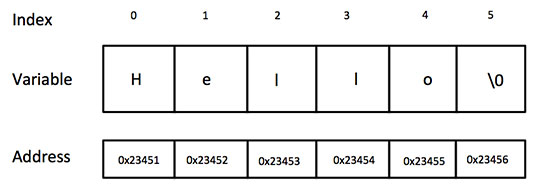
Actually, you do not place the null character at the end of a string constant. The C compiler automatically places the '\0' at the end of the string when it initializes the array. Let us try to print the above mentioned string −
#include <stdio.h>

int main () {

   char greeting[6] = {'H', 'e', 'l', 'l', 'o', '\0'};
   printf("Greeting message: %s\n", greeting );
   return 0;
}
When the above code is compiled and executed, it produces the following result −
Greeting message: Hello
C supports a wide range of functions that manipulate null-terminated strings −
| Sr.No. | Function & Purpose |
|---|---|
| 1 | strcpy(s1, s2); Copies string s2 into string s1. |
| 2 | strcat(s1, s2); Concatenates string s2 onto the end of string s1. |
| 3 | strlen(s1); Returns the length of string s1. |
| 4 | strcmp(s1, s2); Returns 0 if s1 and s2 are the same; less than 0 if s1<s2; greater than 0 if s1>s2. |
| 5 | strchr(s1, ch); Returns a pointer to the first occurrence of character ch in string s1. |
| 6 | strstr(s1, s2); Returns a pointer to the first occurrence of string s2 in string s1. |
The following example uses some of the above-mentioned functions −
#include <stdio.h>
#include <string.h>

int main () {

   char str1[12] = "Hello";
   char str2[12] = "World";
   char str3[12];
   int  len ;

   /* copy str1 into str3 */
   strcpy(str3, str1);
   printf("strcpy( str3, str1) :  %s\n", str3 );

   /* concatenates str1 and str2 */
   strcat( str1, str2);
   printf("strcat( str1, str2):   %s\n", str1 );

   /* total lenghth of str1 after concatenation */
   len = strlen(str1);
   printf("strlen(str1) :  %d\n", len );

   return 0;
}
When the above code is compiled and executed, it produces the following result −
strcpy( str3, str1) :  Hello
strcat( str1, str2)HelloWorld
strlen(str1) : 10


Comments
Post a Comment